Mapping 1.2M pods to exact AWS cost lines
How high-cardinality infrastructure data can become useful cost attribution without adding noisy agents.
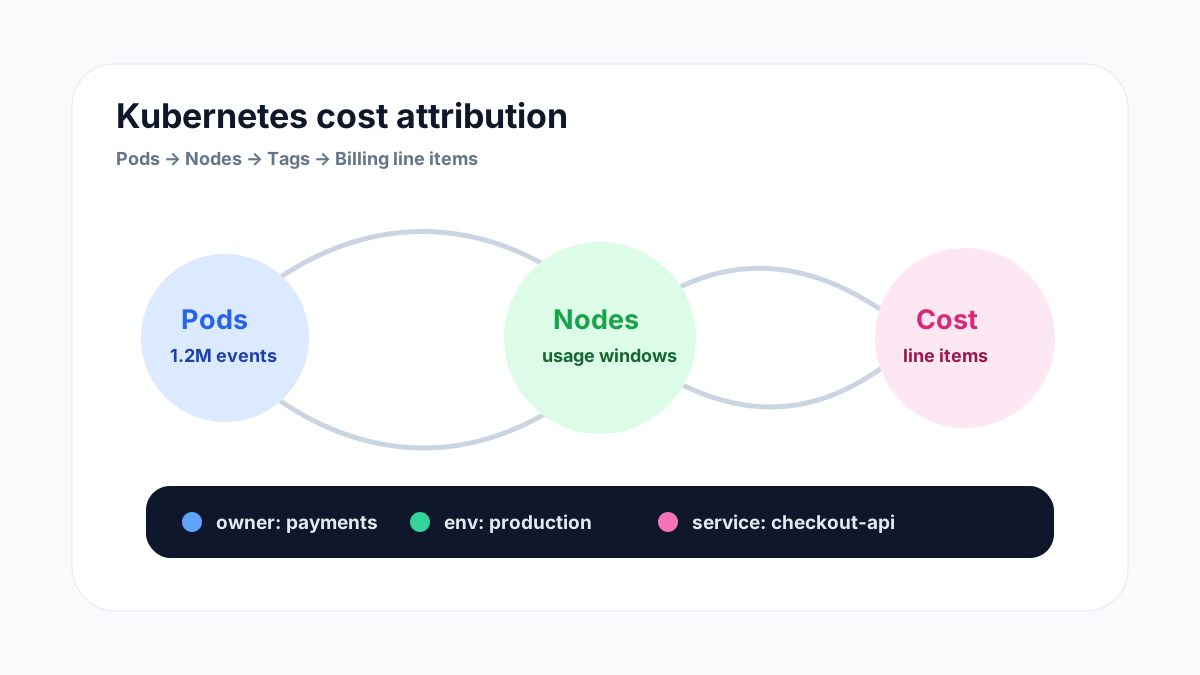
Kubernetes spend gets messy because the thing engineers deploy is not the thing the cloud provider bills. Pods, nodes, volumes, load balancers, and tags all need to be joined before a team can trust the cost number beside a service.
Why Kubernetes attribution breaks
A pod can live for minutes, while an AWS cost line can describe hours of EC2, EBS, NAT, or load balancer usage. The names rarely match. By the time the invoice lands, the workload that created the spend may have been rescheduled, renamed, or removed.
That is why cost attribution cannot be solved by billing exports alone. Teams need workload metadata, cloud inventory, utilization windows, and ownership tags stitched together in a way engineers can audit.
1. Start from stable ownership, not pod names
Pod names are useful for debugging, but they are a weak foundation for cost reporting. Deployment labels, namespace ownership, service tags, and cloud account context are more durable.
- Map namespaces to teams or product areas.
- Normalize labels such as app, service, environment, and owner.
- Track missing or conflicting labels as cost hygiene issues.
2. Join node cost with workload utilization
Most Kubernetes compute cost begins at the node or cluster layer. To make that useful, you need to allocate node cost back to the workloads that reserved or consumed capacity during the same time window.
- Compare requested CPU and memory with actual usage.
- Separate idle node capacity from workload-level utilization.
- Flag services that reserve far more than they use.
3. Include attached services
A service does not only cost what its pods consume. It may create persistent volumes, load balancers, log volume, egress, managed databases, queues, and observability data.
- Attribute persistent volumes to the owning workload.
- Track load balancers and IPs created by ingress resources.
- Connect logging and monitoring spikes back to deployments where possible.
4. Make the result reviewable
Engineering teams will not act on attribution they cannot explain. The cost view needs to show what was included, which tags were used, where data was missing, and what recommendation follows from the evidence.
- Show the source cloud account and resource identifiers.
- Expose utilization and cost windows side by side.
- Keep recommendations specific enough to create a ticket or pull request.
How OggyCloud helps
OggyCloud is designed for modern stacks where cost data lives across cloud providers and SaaS platforms. The dashboard connects inventory, spend, usage signals, and recommendations so engineering can see which services are creating waste.
For teams running Kubernetes, that means attribution is not just a finance report. It becomes a practical workflow for rightsizing, cleanup, and ownership.